


Features
The following are some of the operating features of the Van Gogh CD Rom. (Link for larger screen images at bottom of this page.)
("The Reading" button)
"The Reading" (or Spoken Section): The Spoken section is accessible by clicking this button on the main menu. "The Reading" is the main part of this CD Rom and contains 4 hours of uninterrupted spoken letters from Vincent to Theo as well as many interactive elements.

The Menubar: The "Reading" Menu takes the user to the beginnning of Vincent's life and the staring point of the spoken letters.
The "Sound" Menu controls the sound levels.
The "Chronology" Menu provides access by way of date and location during Vincent's life.
The "Highlights" Menu provides some quick glances at the interactive highlights in the spoken section.
The "Special Menus" Menu provides other ways to access specific items such as photos, letter sketches and painting or drawing by "F" number or title or both. These menus can be used to return specific places in the spoken section.
The "Quit" Menu quits the program.
 Forward and Reverse:
The right and left arrow buttons advance the program to the next sound sequence or about 2 minutes. Unless otherwise indicated, you may advance or go back 10 seconds by holding down the shift key while clicking on the same buttons.
Forward and Reverse:
The right and left arrow buttons advance the program to the next sound sequence or about 2 minutes. Unless otherwise indicated, you may advance or go back 10 seconds by holding down the shift key while clicking on the same buttons.
 The gold frame:
Click on the lower part of the gold frame to make the menubar disappear, if desired.
The gold frame:
Click on the lower part of the gold frame to make the menubar disappear, if desired.
Cursor changes: Indicates possibilities of interaction exist. The "Hand" means something on screen is moveable. The magnifying glass indicate things will appear when the cursor is passed over certain items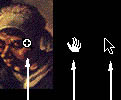 on the screen. The arrow is the default cursor. (Incidentally this image is from the "F82 The Potato Eaters" sequence. During this 12 minute sequence you may access over 90 related drawings and paintings while listening to Vincent's words being read by moving the cursor over the painting.)
Cursor changes: Indicates possibilities of interaction exist. The "Hand" means something on screen is moveable. The magnifying glass indicate things will appear when the cursor is passed over certain items on the screen. The arrow is the default cursor. (Incidentally this image is from the "F82 The Potato Eaters" sequence. During this 12 minute sequence you may access over 90 related drawings and paintings while listening to Vincent's words being read by moving the cursor over the painting.)
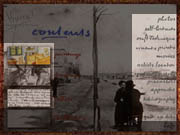
Part Two, The "Catalog":
All buttons (highlighted above) on the "Main Menu"
screen except for "The Reading" provide access into the "Catalog"
sections.